
I've been stuck for a full week building Scrutator (a search and retrieval engine) and Long Term Memory for the Arcanada ecosystem. Both systems need to make hundreds of LLM calls: entity extraction, reranking, classification. The main difficulty turned out to be unstable interaction with CLI models on subscription plans. Yes, it's effectively free, which is great, because the main load in the ecosystem won't be on the agents themselves, but on interaction with the knowledge base and managing it. I've managed to tame the CLI agents — they'll handle the core work: creating content, writing code, performing infrastructure tasks. But the knowledge base will have to work through providers like OpenRouter or direct vendor APIs. And that's expensive. That's why I'm spending so much time at the very start on research and cost optimization.
All of this forced me to run a proper benchmark.
The Setup
Model Connector is my unified REST API that wraps 5 connectors behind a single endpoint. Three are CLI-based (Cursor, Claude Code, Gemini CLI) — they launch console applications that were designed for interactive human use. Two are API-based (OpenRouter, self-hosted Embedding API) — standard HTTP endpoints designed for server workloads.
I sent 5 logic and math questions to 20 models and measured accuracy, latency, and cost. The questions are deliberately simple: a speed calculation, a sheep riddle, a box-labeling puzzle, a factorial, and the classic bat-and-ball problem. If a model can't solve these, it's not ready for knowledge base work.
The Sequential Execution Problem
This is the key discovery of the entire benchmark.
CLI connectors use file-based authentication — keyring files, session tokens, OAuth configs stored on disk. When you call them in parallel, they race on these files. Cursor's cli-config.json breaks with concurrent access — I had to hardcode its concurrency to 1 after losing auth sessions repeatedly. Claude Code and Gemini formally support 4 concurrent calls, but under load they drop auth, hit provider rate limits, and corrupt sessions.
These are console applications. They were built for a human typing in a terminal, not for a server dispatching 100 requests per minute.
The throughput impact is brutal:
| Scenario | CLI (sequential) | API (parallel) | Difference |
|---|---|---|---|
| 5 benchmark questions | 59 seconds | 3 seconds | 20x |
| 100 chunks LTM ingest | ~17 minutes | ~1 minute | 17x |
| 50 rerank results | ~8 minutes | ~30 seconds | 16x |
API providers are largely free of this problem. Stateless Bearer token auth, connection pooling, designed for 10 to 1000+ concurrent requests. Fundamentally different architecture.
The Structured Output Problem
Knowledge base frameworks like Graphiti, Cognee, and LangChain agents expect json_schema — strict Pydantic validation of LLM responses. Field names must be exact. Types must match. This is critical for the entire Arcanada ecosystem: Scrutator uses structured output for entity extraction, and Long Term Memory relies on it for relationship graphs.
Of my 5 connectors, only Claude Code CLI and OpenRouter support native JSON Schema. Cursor and Gemini can only do json_object — they inject "respond in JSON" into the prompt and hope for the best. The LLM often returns correct JSON but with wrong field names (entity_nodes instead of extracted_entities), which breaks Pydantic validation downstream.
I built a proxy with reinforced prompting and post-response field remapping that mostly fixes this. But "mostly" isn't good enough for a pipeline processing thousands of documents.
These two limitations reinforce each other: no structured output + no concurrency = CLI connectors are unsuitable for knowledge base pipelines. Every call is both slow and unreliable in output format.
Benchmark Results
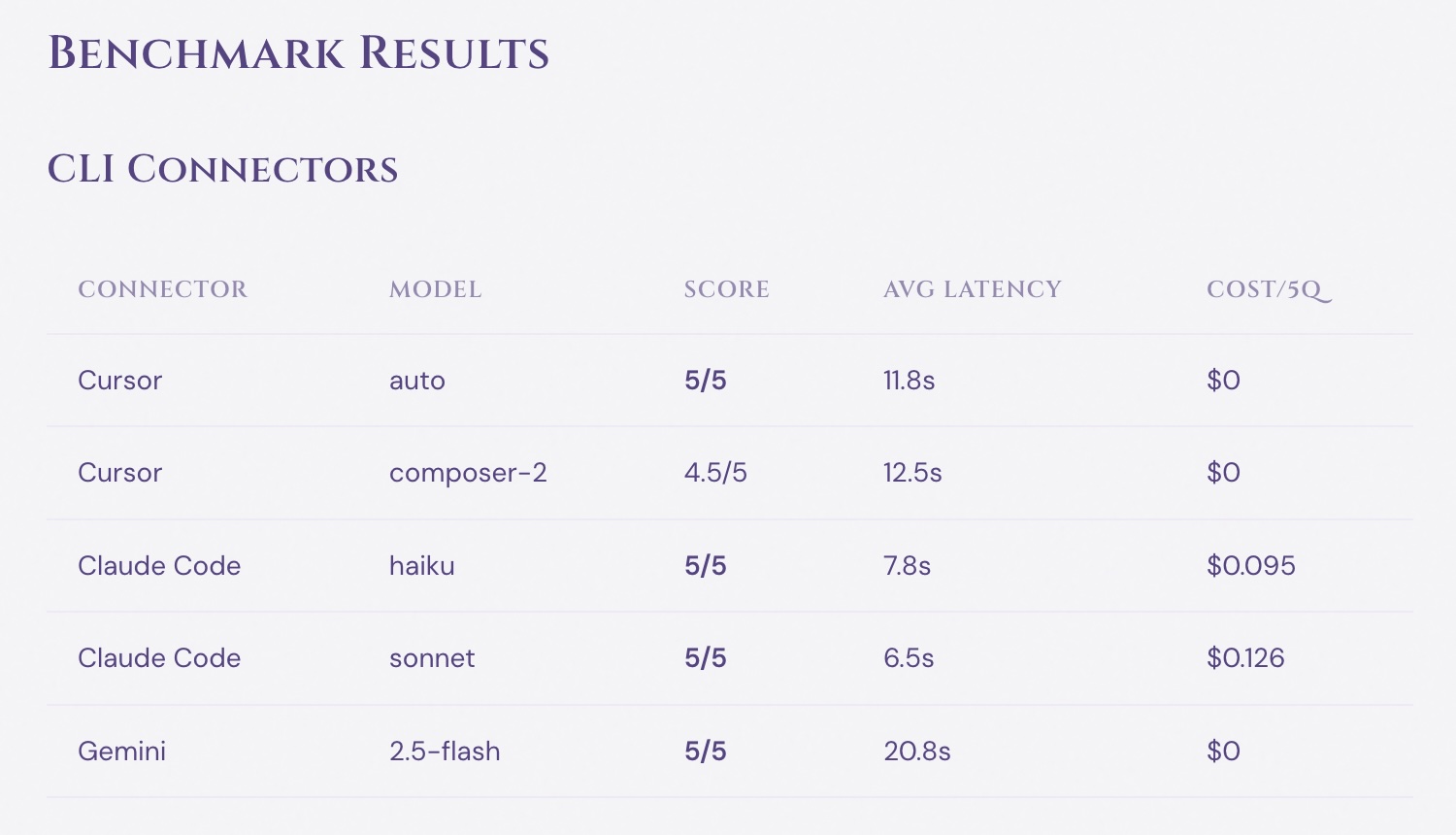
CLI Connectors
| Connector | Model | Score | Avg Latency | Cost/5q |
|---|---|---|---|---|
| Cursor | auto | 5/5 | 11.8s | $0 |
| Cursor | composer-2 | 4.5/5 | 12.5s | $0 |
| Claude Code | haiku | 5/5 | 7.8s | $0.095 |
| Claude Code | sonnet | 5/5 | 6.5s | $0.126 |
| Gemini | 2.5-flash | 5/5 | 20.8s | $0 |
All CLI models nail the logic tasks. Accuracy is not the problem — throughput is.
OpenRouter — Free Models
| Model | Score | Avg Latency | Notes |
|---|---|---|---|
| NVIDIA Nemotron 120B :free | 5/5 | 14.7s | Best free model overall |
| NVIDIA Nemotron 30B :free | 5/5 | 3.5s | Fast and accurate — top pick |
| OpenAI GPT-OSS 120B :free | 5/5 | 5.5s | Perfect accuracy, good speed |
| NVIDIA Nemotron Nano 9B :free | 5/5 | 36.6s | Smallest model with perfect score |
| MiniMax M2.5 :free | 4/4* | 25.1s | *One question timed out |
| InclusionAI Ling 2.6 :free | 3/5 | 0.9s | Fastest model tested |
| Z-AI GLM 4.5 Air :free | 4/4** | ~73s | **Slow, partially rate limited |
Four free models achieve perfect 5/5 accuracy — all NVIDIA Nemotron variants plus OpenAI GPT-OSS. Nemotron 30B is the best overall: fast (3.5s), accurate, and free.
I tested 25+ free models on OpenRouter. Only 7 responded reliably. The rest — including Google Gemma, Meta Llama 70B, Qwen3, Nous Hermes 405B — hit provider-side rate limits after just 1–2 requests. This happens even with a funded account: the providers themselves throttle free endpoints during peak hours. About 70% of the free model catalog on OpenRouter is unreliable for batch workloads.
OpenRouter — Cheap Paid Models
| Model | Score | Avg Latency | Cost/5q |
|---|---|---|---|
| Qwen 3.5 9B | 5/5 | 33.5s | $0.003 |
| Seed 2.0 Mini | 5/5 | 26.4s | $0.002 |
| Step 3.5 Flash | 4/4* | 15.1s | $0.001 |
| GLM 4.7 Flash | 4/5 | 16.6s | $0.002 |
| Kimi K2.6 | 3/5 | 43.7s | $0.015 |
Qwen and Seed both achieve perfect accuracy for under half a cent per 5 questions. At this price point, running 1000 LLM calls costs about 60 cents.
Billing: How CLI Subscriptions Work
CLI models aren't technically free — you pay a subscription:
- Cursor Pro ($20/month) — credit-based billing: the subscription includes a $20 credit pool. Auto mode is economical with credits, manually selecting premium models (Claude Sonnet, GPT-4o) burns through the pool faster. No per-request cost reporting.
- Claude Code Max ($100/month) — flat-fee subscription with token budget that refills every 5 hours. Every request reports exact cost: haiku $0.01–0.04, sonnet $0.02–0.03 per call. The only CLI with native JSON Schema support.
- Gemini CLI (free) — free via personal Google account with a Gemini Code Assist license: 60 requests per minute, 1000 per day. No cost reporting, no JSON Schema, slowest of the three at 20+ seconds average.
For agent tasks (code generation, content writing, infrastructure management) where you make 5–20 calls per session, the subscription model works well. You get high-quality models at effectively zero marginal cost.
For knowledge base pipelines where you make 100–1000 calls per batch, the sequential bottleneck kills you regardless of price.
Infrastructure Issues Found
The benchmark wasn't just about model quality. Running 20 models through a production API surfaced real infrastructure problems that would have bitten me later in LTM and Scrutator pipelines.
Cloudflare proxy timeout
Cloudflare's reverse proxy cuts connections after ~100 seconds. Thinking models like Step 3.5 Flash need 4+ minutes for complex reasoning — the connection drops silently, and the client gets an empty 524 error with no useful diagnostics. During the benchmark, I lost several results to this before I figured out what was happening. The fix: bypass Cloudflare entirely and call Model Connector via its Tailscale internal address. For production, this means any pipeline using thinking models must route around the CDN.
Circuit breaker cascade
Model Connector has a circuit breaker to protect against failing providers — after 5 consecutive errors, it stops sending requests for 30 seconds. The problem: the breaker is per-connector (OpenRouter), not per-model. When a free model like Google Gemma hits its provider-side rate limit, the circuit breaker opens and blocks ALL OpenRouter requests — including paid models that work fine. During testing, one rate-limited free model knocked out my entire OpenRouter pipeline for 30 seconds at a time. For a knowledge base ingest processing hundreds of documents, this turns a minor rate limit into a full pipeline stall. This needs to be redesigned as per-model circuit breaking.
Kimi K2.6 context confusion
Kimi K2.6 answered Q5 with Q4's answer and Q2 with Q1's answer — despite each request being completely independent (separate HTTP calls, no shared context). The model appears to retain phantom context from its internal thinking chain between requests. This is a model-side bug, not something I can fix, but it's worth knowing: Kimi is unreliable for any workload where answer isolation matters.
The Bottom Line
For Long Term Memory and Agent Dreamer, I'll use paid OpenRouter models — the cheapest ones that still deliver quality. At $0.002–0.003 per 5 requests, this is a fraction of a cent per knowledge base operation, and I get parallel execution and strict JSON Schema support.
For development, content creation, and infrastructure tasks, CLI connectors on subscription plans remain the right choice. The agents are tamed, the accuracy is 100%, and the marginal cost is zero.
One unified API, two traffic patterns, zero wasted budget.
Model Connector is open source: github.com/Arcanada-one/model-connector.